
Display
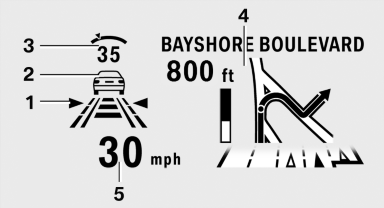
1 Lane departure warning
2 Active Cruise Control
3 Desired speed
4 Navigation system
5 Speed
The collision warning, Night Vision pedestrian warning, or Check Control messages are displayed briefly if needed.
Selecting displays in the Head-up Display
1. "Settings"
2. "Head-up display"
3. "Displayed information"
4. Select the desired displays in the Head-up
Display.
The settings are stored for the remote control currently in use.
Setting the brightness
The brightness is automatically adjusted to the ambient light.
The basic setting can be adjusted manually.
1. "Settings"
2. "Head-up display"
3. "Brightness"
4. Turn the controller.
The brightness is adjusted.
When the low beams are switched on, the brightness of the Head-up Display can be additionally additionally influenced using the instrument lighting, refer
The setting is stored for the remote control currently in use.
Adjusting the height
1. "Settings"
2. "Head-up display"
3. "Height"
4. Turn the controller.
The height is adjusted.
The setting is stored for the remote control currently in use.
See also:
Entering a phone number
Dialing a number
1. "Telephone"
2. "Dial number"
3. Select the digits individually.
4. Select the symbol.
The phone number can also be entered by voice. ...
Performance
The 650i is the only 6 Series trim available for 2012; the convertible is
hitting the market ahead of the hardtop coupe. The rear wheels are powered by a
400-horsepower, twin-turbo 4.4-liter V-8 e ...
HDC Hill Descent Control
The concept
HDC is a downhill driving assistant that automatically
controls vehicle speed on steep downhill
gradients. Without applying the brakes, the
vehicle moves at slightly more than walking
...