
Controls
At a glance
Switching on
 Press the button on the steering
wheel.
Press the button on the steering
wheel.
The marking in the speedometer is set to the current speed.
Cruise control can be used.
Switching off
 Deactivated or interrupted system
If the system is deactivated or interrupted,
actively intervene by braking and, if necessary,
with evasive maneuvers; otherwise, there is the
danger of an accident occurring.◀

Press the button.
▷ If active: press twice.
▷ If interrupted: press once.
The displays go out. The stored desired speed is deleted.
Interrupting
 When active, press the button.
The system is automatically interrupted if:
▷ The brakes are applied.
▷ The clutch pedal is depressed.
▷ Transmission position D is disengaged.
▷ DTC Dynamic Traction Control is activated
or DSC is deactivated.
▷ DSC is actively controlling stability.
▷ HDC is activated.
Maintaining/storing the current speed
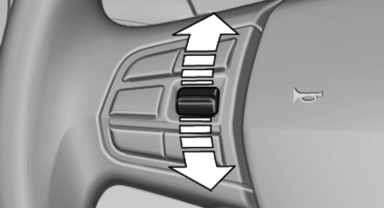
Maintaining/storing the current speed
Press the rocker switch while the system is interrupted.
When the system is switched on, the current speed is maintained and stored as the desired speed.
It is displayed in the speedometer and briefly displayed in the instrument cluster, Displays in the speedometer.
When cruise control is maintained or stored, DSC Dynamic Stability Control is switched on, if necessary.
Change, maintain speed
The rocker switch can be pressed while interrupted to maintain and store the current speed.
Adapting the desired speed<>
Adapt the desired speed to the road conditions
and be ready to brake at all times; otherwise,
there is the danger of an accident occurring.◀
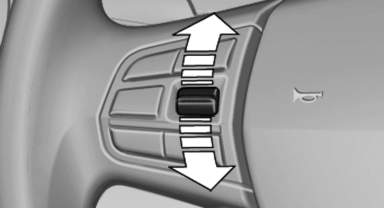
Press the rocker switch up or down repeatedly until the desired speed is set.
If active, the displayed speed is stored and the vehicle reaches the stored speed if the road is clear.
▷ Each time the rocker switch is pressed to the point of resistance, the desired speed increases or decreases by approx. 1 mph/ 1 km/h.
▷ Each time the rocker switch is pressed past the point of resistance, the desired speed increases or decreases by a maximum of 5 mph/10 km/h.
▷ Pressing the rocker switch to the resistance point and holding it accelerates or decelerates the vehicle without requiring pressure on the accelerator. After the rocker switch is released, the vehicle maintains its final speed. Pressing the switch beyond the resistance point causes the vehicle to accelerate more rapidly.
Resuming the desired speed
 Press the button.
The stored speed is reached and maintained.
See also:
Time
Setting the time zone
1. "Settings"
2. "Time/Date"
3. "Time zone"
4. Select the desired time zone.
The time zone is stored.
Setting the time
1. "Settings&quo ...
Vehicle equipment
All standard, country-specific and optional
equipment that is offered in the model series is
described in this chapter. Therefore, equipment
is also described that is not available in a vehicle, ...
Unpairing a device
1. "Telephone"
2. "Bluetooth® (phone)"
3. Highlight the device that is to be unpaired.
4. Open "Options".
5. "Remove phone from list" ...