
Comparison with ordinary remote control
The functions can be controlled by pressing the buttons of the remote control or Comfort Access.
Unlocking
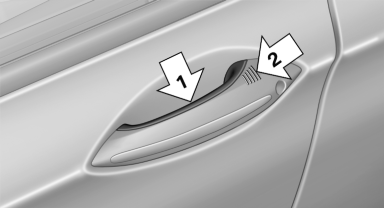
Fully grasp a door handle, arrow 1. This corresponds
to pressing the  button.
Locking
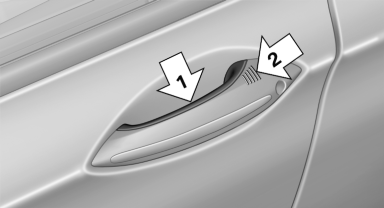
Press the area on the door handle, arrow 2, with your finger for approx. 1 second.
This corresponds to pressing the  button.
To save battery power, ensure that the ignition and all electronic systems and/or power consumers are switched off before locking the vehicle.
Convenient closing
Press the area on the door handle, arrow 2, with the finger and hold it down.
In addition to locking, the windows and the glass sunroof are closed.
 Monitor the closing process
Monitor the closing process to ensure that
no one becomes trapped.◀
Unlocking the trunk lid separately
Press the button on the exterior of the trunk lid
This corresponds to pressing the  button
Do not place the remote control in the
cargo area
Take the remote control with you and do not
leave it in the cargo area; otherwise, the remote
control is locked inside the vehicle when the
trunk lid is closed.◀
See also:
For US customers
The following only applies to vehicles owned
and operated in the US.
If you believe that your vehicle has a defect
which could cause a crash or could cause injury
or death, you should immediate ...
The concept
The system issues a two-phase warning of a
danger of collision at speeds above approx.
10 mph/15 km/h. The time of these warnings
may vary depending on the current driving situation.
The collisi ...
Breakdown assistance
Vehicle equipment
All standard, country-specific and optional
equipment that is offered in the model series is
described in this chapter. Therefore, equipment
is also described that is not avai ...