
Components of the integrated Owner's Manual
The integrated Owner's Manual consists of three parts, which offer various levels of information or access possibilities.
Quick Reference Guide
Located in the Quick Reference is important information for the operation of the vehicle, the operation of basic vehicle functions or for what to do in the event of a flat tire. This information can also be displayed during driving.
Search by pictures
Information and descriptions based on illustrations can be searched via search by pictures.
This is helpful, for example, if the description of an outfitting package that cannot be named is needed.
Owner's Manual
Information and descriptions can be searched by direct entry of a search term via the index.
Select components
1.  Press the button.
2. Turn the controller: open "Vehicle Info".
3. Press the controller.
4. Selecting desired range:
▷ "Quick reference"
▷ "Search by pictures"
▷ "Owner's Manual"
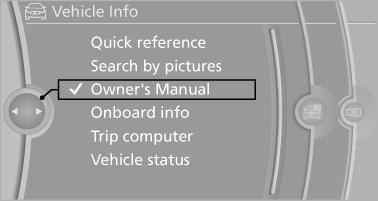
Select components
See also:
Pinch protection system
If the closing force when closing the glass sunroof
exceeds a certain value, the closing movement
is stopped, beginning at approximately the
middle of the opening in the roof, or from the
tilt ...
Displays in the instrument cluster
Indicator lamp
Depending on how the vehicle is
equipped,
the indicator lamp in the instrument
cluster indicates whether the system is
switched on.
Desired speed
▷ The marking lights ...
Messages
Information about messages. ...