
Displaying the button assignment
Use a finger to touch the buttons. Do not wear gloves or use objects.
The key assignment is displayed at the top edge of the screen.
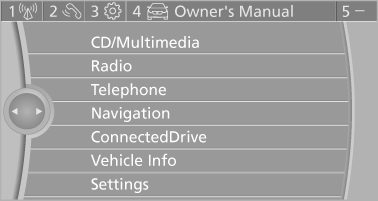
Displaying the button assignment
▷ To display short information: touch the button.
▷ To display detailed information: touch the
button for an extended period.
See also:
Calling up the stored desired speed and distance
While driving
Press button 4, All of the displays
in the instrument panel lights
While standing
Before leaving the vehicle
Before leaving the vehicle with the engine
running, engage po ...
New dimensions in driving pleasure and dynamic performance: Sporty power
delivery, outstanding efficiency and enhanced ride comfort
The sixth-generation BMW 3-Series sports sedan models offer top-level agility
and driving dynamics, and they combine all this with new levels of comfort. At
the same time, there is no change to th ...
SPORT
Sporty driving with optimized chassis and suspension
with maximum driving stabilization.
The program can be configured to individual
specifications. The configuration is stored for
the remote c ...