
Switching the split screen on and off
1.  Press the button.
2. "Split screen"
3. Move the controller until the split screen is
selected.
4. Press the controller or select "Split screen
content".
5. Select the desired menu item.
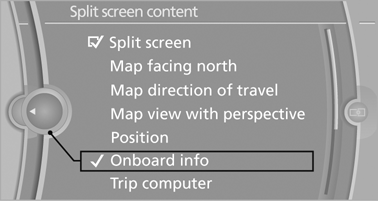
Selecting the display
See also:
A host of active safety systems reduce the risk of accidents
A selection of electronic assistance systems make an active contribution to
driving safety in the new BMW 3-Series, helping drivers to avoid collisions in
the first place. The functions of the mai ...
Setting the voice dialog
You can set whether the system should use the
standard dialog or a shorter version.
In the shorter variant of the voice dialog, the announcements
from the system are issued in an
abbreviated fo ...
Switching off automatically
System switches off: above approx. 9 mph/
15 km/h.
Switch on the system again if necessary. ...