
Opening the Options menu
 Press the button.
The "Options" menu is displayed.
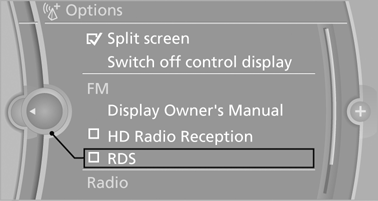
Additional options: move the controller to the right repeatedly until the "Options" menu is displayed.
Options menu
The "Options" menu consists of various areas:
▷ Screen settings, e.g., "Split screen".
This area remains unchanged.
▷ Control options for the selected main menu,
e.g., for "Radio".
▷ If applicable, further operating options for
the selected menu, e.g., "Store station".
See also:
Pinch protection system
If the closing force when closing the glass sunroof
exceeds a certain value, the closing movement
is stopped, beginning at approximately
one-third of the opening in the roof, or from the
tilte ...
Using the door lock
General information
Locking from the outside
Do not lock the vehicle from the outside if
there are people in it, as the vehicle cannot be
unlocked from inside without special knowledge.
The ...
Switching off automatically
The system switches off and the LED goes out:
▷ After approx. 165 ft/50 m when driving forward.
▷ After approx. 22 mph/35 km/h when driving
forward.
Switch on the system again if nece ...