
Selecting menu items
Menu items shown in white can be selected.
1. Turn the controller until the desired menu item is highlighted.
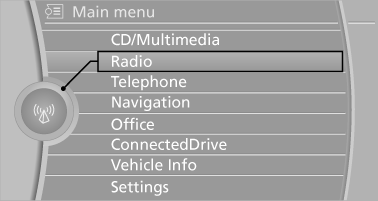
2. Press the controller.
Menu items in the Owner's Manual
In the Owner's Manual, menu items that can be selected are set in quotation marks, e.g., "Settings".
See also:
The concept
The parking brake is primarily intended to prevent
the vehicle from rolling while parked; it
brakes the rear wheels.
...
Compatibility
If this symbol is printed on the
packaging
or in the instructions of the hand-held
transmitter, the remote-controlled device is
generally compatible with the integrated universal
remote con ...
Managing the favorites
Activating/deactivating the favorites
Favorites can be activated and deactivated
globally and individually.
1. "Satellite radio"
2. "Manage
favorites"
3. Select "Activ ...