
Control Display
Notes
▷ To clean the Control Display, follow the care
instructions.
▷ Do not place objects close to the Control
Display; otherwise, the Control Display can
be damaged.
Switching off
1.  Press the button.
2. "Switch off control display"
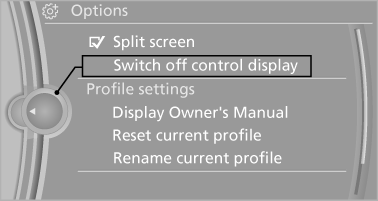
Switch off control display
Switching on
Press the controller again to switch the screen back on.
See also:
Office information
The number of unread messages and active
tasks as well as the upcoming appointments are
displayed.
1. "Office"
2. "Current office"
3. Select the desired entry to display det ...
Vehicle equipment
All standard, country-specific and optional
equipment that is offered in the model series is
described in this chapter. Therefore, equipment
is also described that is not available in a vehicle,
e ...
Integrated Owner's Manual in the vehicle
The integrated Owner's Manual can be displayed
on the Control Display. The equipment
and functions that are in the vehicle are described
therein. ...