
Controls
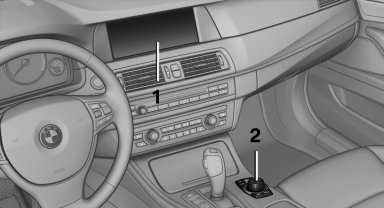
Controls at a glance
1. Control Display
2. Controller with buttons
The buttons can be used to open the menus
directly. The controller can be used to select
menu items and create the settings.
See also:
Switching off automatically
System switches off: above approx. 9 mph/
15 km/h.
Switch on the system again if necessary. ...
Settings for the map view
The settings are stored for the remote control
currently in use.
1. "Navigation"
2. "Map"
3. Open "Options".
4. "Settings"
5. To set the map view:
υ ...
Adjusting the volume
Turn the knob until the desired volume is selected.
The setting is stored for the remote control
currently in use.
The vehicle automatically adjusts the volume of
the microphone on the telepho ...