
Initiating an Emergency Request
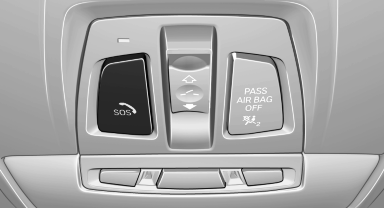
1. Press the cover briefly to open it.
2. Press the SOS button until the LED in the button lights up.
▷ The LED lights up: an Emergency Request was initiated.
If the situation allows, wait in your vehicle until the voice connection has been established.
▷ The LED flashes if the connection to the BMW Assist Response Center has been established.
After the Emergency Request arrives at the BMW Assist Response Center, the BMW Assist Response Center contacts you and takes further steps to help you.
Even if you are unable to respond, the BMW Assist Response Center can take further steps to help you under certain circumstances.
For this purpose, data that are used to determine the necessary rescue measures, such as the current position of the vehicle if it can be established, are transmitted to the BMW Assist Response Center.
▷ If the LED is flashing but the BMW Assist Response Center cannot be heard on the hands-free system, the hands-free system may be malfunctioning. However, the BMW Assist Response Center may still be able to hear you.
Initiating an Emergency Request automatically
Under certain conditions, an Emergency Request is automatically initiated immediately after a severe accident. Automatic Collision Notification is not affected by pressing the SOS button.
See also:
BMW Maintenance System
The maintenance system directs you to required
maintenance measures and thereby supports
you in maintaining road safety and the operational
reliability of the vehicle. ...
Video playback
OverviewVideo playback possible via snap-in adapter. They can be operated via iDrive.
Sound is output over the vehicle speakers.
PlaybackFor your own safety, the video image is only displayed up to ...
Controls
1 Change the entertainment source
2 CD/DVD drive
3 Eject CD/DVD
4 Change station/track
5 Programmable memory buttons
6 Volume, on/off ...