
New contact
General information
A contact can have up to 8 phone numbers, 2 addresses, 3 e-mail addresses and one Internet address.
1. "Office".
2. "Contacts".
3. "Options" Open.
4. "New contact"
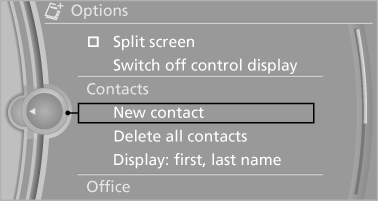
5. The entry fields are still filled with the previous entries: "Delete input fields".
6. Fill in the entry fields: select the symbol next to the entry field.
7. Enter the text and assign the contact type.
8. In the navigation system: enter address.
Only addresses contained in the navigation data in the vehicle can be entered. This ensures that destination guidance is possible for all addresses.
If necessary, "Accept address".
9. "Store contact in vehicle"
Contact types
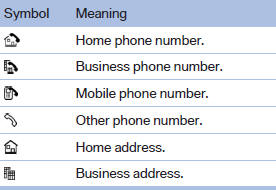
Various contact types can be assigned to phone numbers and addresses.
Specifying the home address
A home address can be stored. It appears at the top of the contact list.
1. "Home".
2. Create a contact.
3. "Store contact in vehicle"
See also:
Navigation bar overview
The functions of the navigation bar symbols can
also be stored on the programmable memory
buttons ...
First aid kit
The first aid kit is located in the container on the
inside of the trunk lid.
Unscrew the wing nut to open.
Some of the articles have a limited service life.
Check the expiration dates of the c ...
Safety information
The tire characteristics and tire inflation pressure
influence the following:
▷ The service life of the tires.
▷ Road safety.
▷ Driving comfort. ...