
Phone book
Displays
The phone book accesses the contacts and shows all contacts for which a phone number has been stored. The entries can be selected to make a call.
1. "Telephone".
2. "Phone book"
A symbol indicates the storage location of the contacts.
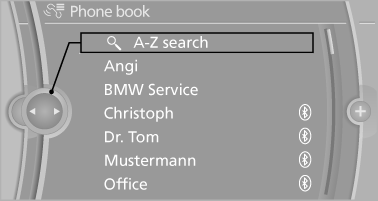
Calling a contact
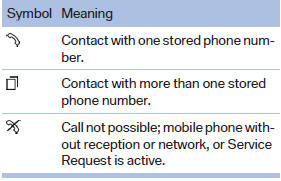
For contacts with one stored phone number: select the required contact. The connection is established.
For contacts with more than one stored phone number: select the required contact and the phone number. The connection is established.
Editing a contact
Changing the entries in "Contacts". When a contact is changed, the changes are not stored on the mobile phone. A copy of the entry is stored in the vehicle.
1. Highlight the contact.
2. Open "Options".
3. "Edit entry"
The contact can be edited.
See also:
Remote control
Remote control
1. Menu navigation
2. Volume for headphones with jack plug
3. Changing track or chapter during CD-,
DVDor AUX playback, fast forward/rewind
4. Headphones right/left
5. Open sta ...
Redialing
General information
The list of dialed numbers in the mobile phone
is transmitted to the vehicle depending on the
mobile phone. The 20 phone numbers dialed
last are displayed. The sorting order ...
Notes
If the battery is discharged, an engine can be
started using the battery of another vehicle and
two jumper cables. Only use jumper cables
with fully insulated clamp handles.
To prevent personal ...