
One lever for all functions
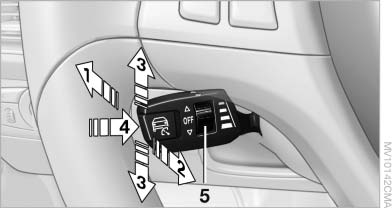
One lever for all functions
1 Storing and increasing the desired speed
2 Storing and red
3 Interrupting or deactivating the system
4 Retrieving the stored desired speed and distance or driving away
5 Selecting the distance to the vehicle ahead
See also:
Closing
Danger of pinching
Monitor the closing process and make
sure that the closing path of the window is clear;
otherwise, injuries may result.
Pull the switch to the resistance point.
The win ...
Front ventilation
▷ Thumbwheels for adjusting the temperature,
arrows 1.
Toward blue: colder.
Toward red: warmer.
▷ Lever for changing the air flow direction, arrow
2.
▷ Thumbwheels for open ...
Malfunction
A Check Control message is displayed.
On the Control Display, the areas in front of and
behind the vehicle are shaded. PDC has failed.
Have the system checked.
To ensure full operability:
...