
Phone book
Displays
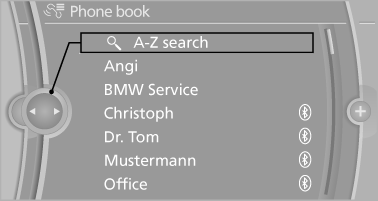
The phone book accesses the contacts and shows all contacts for which a phone number has been stored. The entries can be selected to make a call.
1. "Telephone".
2. "Phone book"
All contacts with a phone number are displayed.
A symbol indicates the storage location of the contacts.
Calling a contact
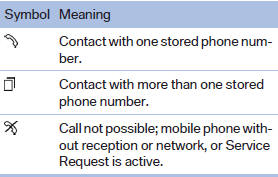
For contacts with one stored phone number: select the required contact. The connection is established.
For contacts with more than one stored phone number: select the required contact and the phone number. The connection is established.
Editing a contact
Changing the entries in "Contacts". When a contact is changed, the changes are not stored on the mobile phone. A copy of the entry is stored in the vehicle.
1. Highlight the contact.
2. Open "Options".
3. "Edit entry"
The contact can be edited.
See also:
COMFORT
Comfort-oriented tuning of the shock absorbers
for optimal traveling comfort with maximum
driving stabilization.
Activating COMFORT
Press the button repeatedly
until COMFORT
appears in the ...
Replacing the battery
Replacing the battery
1. Take the integrated key out of the remote
control.
2. Push in the catch with the key, arrow 1.
3. Remove the cover of the battery compartment;
see arrow 2.
4. Insert ...
Vehicle equipment
All standard, country-specific and optional
equipment that is offered in the model series is
described in this chapter. Therefore, equipment
is also described that is not available in a vehicle,
e ...