
Pairing and connecting
 Pairing the mobile phone
To avoid becoming distracted and posing an unnecessary hazard both to your own vehicle's occupants and to other road users, only pair the mobile phone while the vehicle is stationary.
1. "Telephone".
2. "Bluetooth® (phone)"
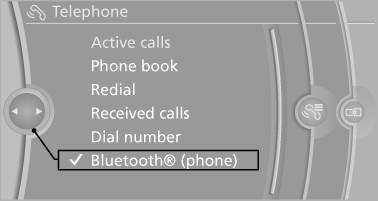
3. "Add new phone".
The Bluetooth name of the vehicle is displayed.
4. To perform additional steps on the mobile phone, refer to the mobile phone operating instructions: e.g. search for or connect the Bluetooth device or a new device.
The Bluetooth name of the vehicle appears on the mobile phone display.
5. Select the Bluetooth name of the vehicle on the mobile phone display.
6. You are prompted by the iDrive or mobile phone to enter the same Bluetooth passkey.
Enter the passkey and confirm.
or
Compare the control number in the display of the vehicle to the control number in the display of the mobile phone. Confirm the control number in the mobile phone and in the vehicle.
"OK"
7. Select the functions for which the mobile phone is to be used.
8. "OK"
If the pairing was successful, the mobile phone appears at the top of the list of mobile phones.
Four mobile phones can be paired with the vehicle at once.
If pairing was unsuccessful: what to do if.
See also:
Engine oil
The engine oil consumption is dependent on driving style and driving conditions.
Checking oil levelYour car is equipped with an electronic oil-level monitor.
For precise measurement and display of t ...
The concept
DSC prevents traction loss in the driving wheels
when driving away and accelerating.
DSC also recognizes unstable vehicle conditions,
such as fishtailing or nose-diving. Subject
to physical lim ...
General information
Lamps and bulbs make an essential contribution
to vehicle safety.
The manufacturer of the vehicle recommends
that you entrust corresponding procedures to
the service center if you are unfamilia ...