
Playback
Loading the CD/DVD player
Insert the CD/DVD with the printed side up.
Playback begins automatically.
Reading can take a few minutes with compressed audio files.
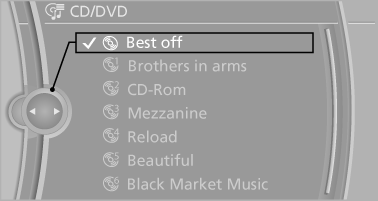
Starting playback
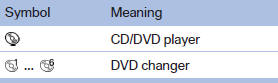
A CD/DVD is located in the CD/DVD player or DVD changer.
1. "CD/Multimedia".
2. "CD/DVD".
3. Select the desired CD or DVD.
Playable formats
▷ DVD: DVD-ROM, DVD-R, DVD+R, DVDRW, DVD+RW, DVD-R DL, DVD+R DL, DVD audio (video part only), DVD video.
▷ CD: CD-ROM, CD-R, CD-RW, CD-DA, VCD, SVCD.
▷ Compressed audio files: MP3, WMA, AAC, M4A.
CD/DVD removal
1.  Press the button.
The CD/DVD is partially ejected.
2. Remove the CD/DVD.
See also:
Seats with safety belt
The vehicle has five seats, each of which is
equipped with a safety belt. ...
High beams/roadside parking lamps
High beams/roadside parking lamps
1. High beams
2. Headlamp flasher
3. Roadside parking lamps ...
Avoid high engine speeds
Use 1st gear to get the vehicle in motion. Beginning
with 2nd gear, accelerate rapidly. When
accelerating, shift up before reaching high engine
speeds.
When you reach the desired speed, shift i ...