
Controls
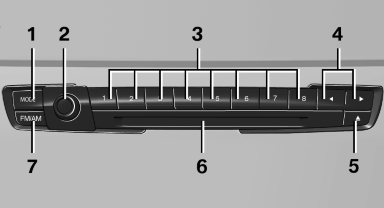
1 Change entertainment sources
2 Volume, on/off
3 Programmable memory buttons or radio station buttons
4 Change station/track
5 Eject CD/DVD
6 CD/DVD drive
7 Change wave band
See also:
California Proposition 65 Warning
California laws require us to state the following
warning:
Engine exhaust and a wide variety of automobile
components and parts, including components
found in the interior furnishings in a vehi ...
Check the tire inflation pressure regularly
Check and, if necessary, correct the tire inflation
pressure at least twice a month and before starting
on a long trip.
Low tire inflation pressure increases rolling resistance
and thus raises ...
What to do if...
The current transmission position cannot be
displayed?
The vehicle is located in an unrecognized
region, is in a poor reception area, or the
system is currently determining the position. ...