
Storing a channel
1. "Radio".
2. "Satellite radio".
3. If necessary, open "All channels" or the desired category.
4. Select the desired channel.
5. Press the controller again.
6. Press the controller again to confirm the highlighted channel.
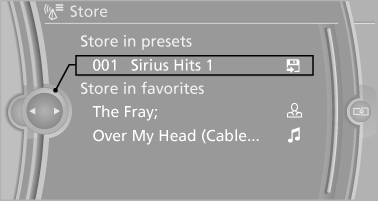
7. Select the desired memory location.
The channels are stored for the remote control currently in use.
With navigation system: the stations can also be stored on the programmable memory buttons.
See also:
Front
Seat heating
The temperature setting progresses one step
through its control sequence each time you
press the button. The maximum temperature is
reached when three LEDs are lit.
To switch of ...
Apps
At a glanceCertain software applications of a suitable mobile phone can be integrated into
the vehicle. These software applications are displayed on the Control Display. They
can be operated via i ...
A More Muscular X5
The X5 M's styling is more aggressive than the regular X5's, but the changes
have been tastefully integrated into the overall design. One thing that might be
deemed a little over-the-top is the fr ...