
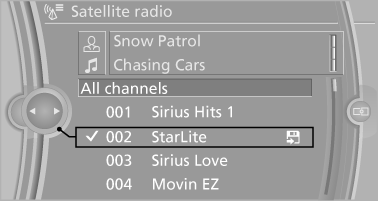
Selecting channels
You can only listen to enabled channels.
The selected channel is stored for the remote control currently in use.
Via iDrive
1. "Radio".
2. "Satellite radio".
3. Select "All channels" or the desired category.
4. Select the desired channel.
Via the buttons on the center console

Press the button.
The next channel is selected.
Via direct channel entry
1. "Radio".
2. "Satellite radio".
3.  "Set channel".
4. Turn the controller until the desired channel is reached and press the controller.
See also:
Street does not exist in the destination
city/town
The desired street does not exist in the specified
city/town because it belongs to another part of
the city/town.
1. "Navigation"
2. "Enter address"
3. Select "Street&q ...
Switching on/off and interrupting
cruise control
Switching on
Press the button on the steering
wheel.
The indicator lamps in the instrument cluster
light up and the mark in the speedometer is set
to the current speed.
Cruise control can be ...
Tailormade driving dynamics
The latest generation BMW 7-Series is the first to have Dynamic Driving
Control featuring Dynamic Damping Control as standard. Dynamic Driving Control
is the umbrella function that lets a driver c ...