
Controls
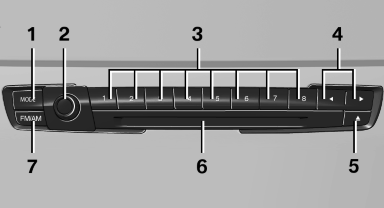
1 Change entertainment sources
2 Volume, on/off
3 Programmable memory buttons or radio station buttons
4 Change station/track
5 Eject CD/DVD
6 CD/DVD drive
7 Change wave band
See also:
Pedestrian detection
The pedestrian detection and warning system
only operates in darkness and only when a heat
image is displayed.
Warm objects that are similar in shape to human
beings are detected by the syste ...
BMW Maintenance System
The maintenance system directs you to required
maintenance measures and thereby supports
you in maintaining road safety and the operational
reliability of the vehicle. ...
Filtering the message list
The message list can be filtered, when more
than one type of message exists.
1. "Filter:"
2. Select the type of message.
"All"
All messages are displayed.
"E-m ...