
Filtering traffic bulletins
You can set which traffic bulletins appear on the map.
1. "Navigation".
2. "Map".
3. "Options" Open.
4. "Traffic Info categories".
5. Select the desired categories.
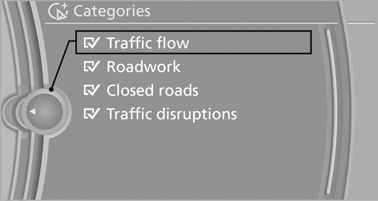
Traffic bulletins of the selected category are displayed on the map.
▷ Traffic bulletins that are relevant to the route are always shown.
▷ For your own safety, traffic bulletins that notify you of potentially dangerous situations, such as wrong-way drivers, cannot be hidden.
See also:
Destination entry by map
Selecting the destination
1. "Navigation"
2. "Map"
The current position of the vehicle is indicated
on the map.
3. "Interactive map"
4. Select the destination w ...
Opening and closing: Using the remote control
Persons or animals in a parked vehicle could
lock the doors from the inside. You should therefore take the remote control with
you when you leave the vehicle so that the latter can be opened from ...
Audio playback
Selecting a track using the buttonPress the
button for the appropriate direction as often as
necessary until the desired track is reached.
Selecting a track using iDriveAudio CDs
1. " ...