
Planning a trip with intermediate destinations
New trip
A trip can be planned with several intermediate destinations.
1. "Navigation"
2. "Map"
3. Move the controller to the left if necessary.
4. "Guidance"
5. "Enter new destination"
6. Select the type of destination entry.
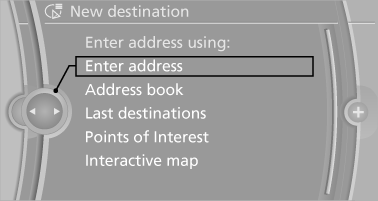
7. Enter the intermediate destination.
8. "Start guidance"
Entering intermediate destinations
A maximum of 30 intermediate destinations can be entered for one trip.
1. "Enter new destination".
2. Select the type of destination entry.
3. Enter the intermediate destination.
4. "Add as another destination".
The intermediate destination is entered in the destination list and is highlighted.
5. Turn the controller until the intermediate destination is located in the desired position in the list.
6. Press the controller.
Starting the trip
1. After all intermediate destinations are entered, highlight the first destination.
If the second destination, for example, is highlighted when destination guidance is started, the first destination is skipped.
2. "Start guidance".
 This symbol marks the active leg
of the
trip.
This symbol marks the active leg
of the
trip.
Storing a trip
Up to 30 trips can be stored in the trip list. If necessary, delete existing trips to be able to store new trips.
1. Open "Options".
2. "Store trip".
3. Enter the name.
4. "OK"
Selecting a stored trip
1. "Navigation".
2. "Stored trips".
3. Select a stored trip.
4. "Start guidance"
Reversing the direction of travel
Intermediate destinations are displayed in reverse order in the list.
1. "Map".
2.  "Guidance".
3. Open "Options".
4. "Reverse order of trip dest."
Intermediate destination options
1. "Map".
2. "Guidance".
3. "Display all trip destinations".
4. Select an intermediate destination.
▷ "Edit destination".
▷ "Reposition dest. in the trip": move an intermediate destination to another position in the list.
▷ "Delete dest. in the trip".
▷ "Go to next dest. in the trip".
Some options are not available for certain trips.
Deleting a stored trip
1. "Stored trips".
2. Highlight the desired trip.
3. Open "Options".
4. "Delete all trips" or "Delete trip"
Calling up the last trip
1. "Navigation".
2. "Stored trips".
3. "Last trip".
4. "Start guidance"
See also:
Remove unnecessary cargo
Additional weight increases fuel consumption. ...
Date
The settings are stored for the remote control
currently in use.
Setting the date
1. "Settings"
2. "Time/Date"
3. "Date:"
4. Turn the controller until the desired ...
Changing the map section
"Interactive map"
To shift the map: move the controller in the
required direction.
To shift the map diagonally: move the controller
in the required direction and turn it.
...