
Destination entry by map
Selecting the destination
1. "Navigation"
2. "Map"
The current position of the vehicle is indicated
on the map.
3.  "Interactive map"
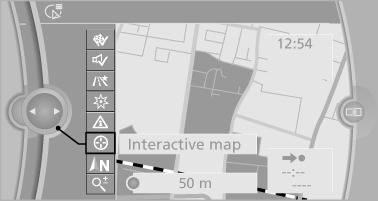
4. Select the destination with crosshairs.
▷ To change the scale: turn the controller.
▷ To shift the map: move the controller in the required direction.
▷ To shift the map diagonally: move the controller in the required direction and turn it.
Specifying the street
If the system does not recognize a street, one of the following is displayed:
▷ The name of a street nearby.
▷ The county.
▷ The coordinates of the destination.
Additional functions
Additional functions are available on the interactive map after the controller is pressed.
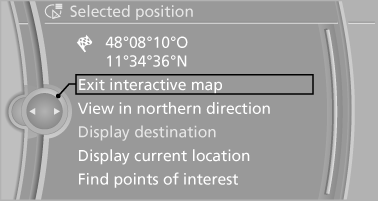
▷  Select the symbol.
"Start guidance" or "Add as another destination".
▷ "Exit interactive map": return to the map view.
▷ "View in northern direction" or "View in driving direction".
▷ "Display destination": the map section around the destination is displayed.
▷ "Display current location": the map section around your current location is displayed.
▷ "Find points of interest": the search for special destinations is started.
See also:
Opening
During opening, the trunk lid pivots back and up.
Ensure that adequate clearance is available before
opening.
Opening from the outside
Press the button on the trunk lid.
Press the button ...
Enlarging the cargo area
General information
The cargo area can be enlarged by folding down
the rear seat backrests.
The rear seat backrest is divided into two parts
at a ratio of 60 to 40.
If equipped with through-l ...
My Info
Starting destination guidance
1. Select the desired message.
2. "Start guidance" or "Add as another
destination"
Dialing the number in the message
Up to 4 phone numbers can b ...