
Front ventilation
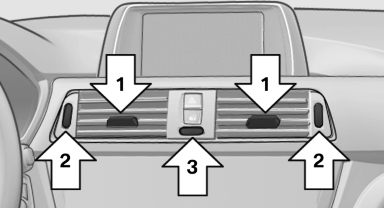
Front ventilation
▷ Lever for changing the air flow direction, arrow 1.
▷ Thumbwheels for opening and closing the vents continuously, arrows 2.
▷ Thumbwheel to vary the temperature, arrow 3.
Toward blue: colder.
Toward red: warmer.
Adjusting the ventilation
▷ Ventilation for cooling:
Adjust the vent to direct the air in your direction,
e.g., if the vehicle interior is hot from
the sun.
▷ Draft-free ventilation:
Adjust the vent to let the air flow past you.
See also:
Brake force display
The concept
During normal brake application, the outer
brake lamps light up.
During heavy brake application, the inner
brake lamps light up in addition.
...
Releasing
Raise lever slightly, press the button and guide
the lever down. ...
Data transfer
During the updating of BMW services, display
the status of the data transfer.
1. "BMW Assist" or "ConnectedDrive"
2. "Options" Open.
3. "Data transfer" ...