
Display on the Control Display
The traffic area to the left and right is displayed on the Control Display.
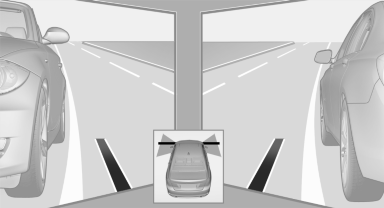
Guidelines at the bottom of the image show the position of the front of the vehicle.
Brightness
With the Side View switched on:
1.  "Brightness"
2. Turn the controller until the desired setting is reached and press the controller.
Contrast
With the Side View switched on:
1.  "Contrast"
2. Turn the controller until the desired setting is reached and press the controller.
See also:
Screw thread
Push out the cover by pressing on the top edge. ...
Text messages
Text messages at the upper edge of the Control
Display explain the meaning of the displayed indicator
and warning lamps. ...
For your own safety
Maintenance and repairs
Advanced technology, e.g., the use of modern
materials and high-performance electronics, requires suitable maintenance and
repair methods.
Therefore, have this work perfo ...