
SPORT
Sporty driving with optimized chassis and suspension with maximum driving stabilization.
The program can be configured to individual specifications. The configuration is stored for the remote control currently in use.
Activating SPORT
Press button repeatedly until SPORT is displayed in the instrument cluster.
Configuring SPORT
When the display is activated on the Control Display, the sport program can be set to individual specifications.
▷ Activate the sport program.
▷ "Configure SPORT mode".
▷ Configure the program.
Optionally, the sport program can be configured
before it is activated:
1. "Settings"
2. "SPORT mode"
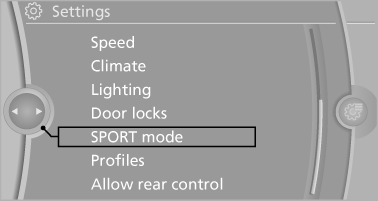
3. Configure the program.
This configuration is retrieved when the sport program is activated.
See also:
Connecting electrical devices
Note
Do not plug the charger into the socket
Do not connect battery chargers to the
factory-installed sockets in the vehicle. Doing so
may result in damage to the vehicle.◄
Sockets
Socket ...
Operating from the inside
Via the button for the central locking system.
If the vehicle has been locked from inside, the
fuel filler flap remains unlocked.
If an accident of a certain severity occurs, the
central locki ...
Safety
Besides options like lane departure warning, the 5 Series comes equipped with
a suite of side curtain airbags and front-seat side-impact airbags. Rear
seat-mounted airbags can be ordered as a $385 ...