
Brightness
Setting the brightness
To set the brightness of the Control Display:
1. "Settings"
2. "Control display"
3. "Brightness"
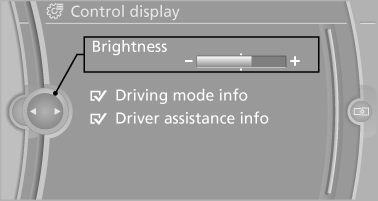
4. Turn the controller until the desired brightness
is set.
5. Press the controller.
The setting is stored for the remote control currently in use.
Depending on the light conditions, the brightness control may not be clearly visible.
See also:
The concept
Two radar sensors below the rear bumper monitor
the area behind and next to the vehicle at
speeds above approx. 30 mph/50 km/h.
The system indicates whether there are vehicles
in the blind sp ...
Replacing components
Vehicle equipment
All standard, country-specific and optional
equipment that is offered in the model series is
described in this chapter. Therefore, equipment
is also described that is not avai ...
General information
Instructions for voice activation system.
To have the available spoken instructions read
out loud: ›Voice commands‹ ...