
Language
Setting the language
To set the language on the Control Display:
1. "Settings"
2. "Language/Units"
3. "Language:"
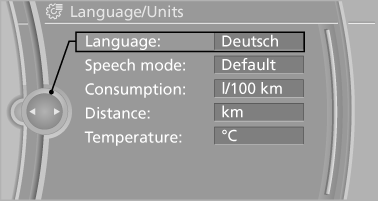
4. Select the desired language.
The setting is stored for the remote control currently in use.
See also:
Display
Display
▷ Lines, arrow 1: the system is activated.
▷ Arrows, arrow 2: at least one lane marking
was detected and warnings can be issued. ...
Warning stages
Prewarning
This warning is issued, for example, when there
is the impending danger of a collision or the distance
to the vehicle ahead is too small.
Acute warning
Warning of the imminent danger ...
General information
Do not adjust the seat while
driving
Do not adjust the driver's seat while driving,
or the seat could respond with unexpected
movement and the ensuing loss of vehicle control
could lead to a ...