
Display on the Control Display
Display the computer or trip computer on the Control Display.
1. "Vehicle Info"
2. "Onboard info" or "Trip computer"
Resetting the fuel consumption or speed
1. "Vehicle Info"
2. "Onboard info"
3. "Cons." or "Speed"
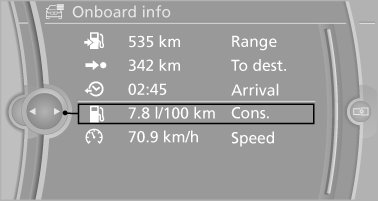
4. "Yes"
See also:
System limits
Personal responsibility
The high-beam assistant cannot serve as
a substitute for the driver's personal judgment
of when to use the high beams. Therefore, manually
switch off the high beams in sit ...
Adjusting the volume
Turn the knob until the desired volume is selected.
The setting is stored for the remote control
currently in use.
The vehicle automatically adjusts the volume of
the microphone on the telephone ...
External devices
At a glance
...