
Speed limit
Display of a speed limit which, when reached, should cause a warning to be issued.
Renewed warning if the vehicle speed drops below the set speed limit once by at least 3 mph/ 5 km/h.
Displaying, setting or changing the limit
1. "Settings"
2. "Speed"
3. "Warning at:"
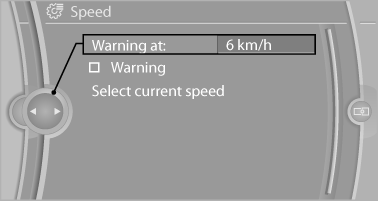
4. Turn the controller until the desired limit is
displayed.
5. Press the controller.
The speed limit is stored.
Activating/deactivating the limit
1. "Settings"
2. "Speed"
3. "Warning"
4. Press the controller.
Applying your current speed as the limit
1. "Settings"
2. "Speed"
3. "Select current speed"
4. Press the controller.
The current vehicle speed is stored as the limit.
See also:
Controls
Controls
1 Volume, on/off
2 Change wave band
3 Change entertainment sources
4 Change station/track
5 Programmable memory buttons ...
Video playback
Country codes
Only DVDs with the code of the home region can
be played back; also refer to the information on
the DVD.
Playback
The video image is displayed on the front Control
Display u ...
Speed limit
Display of a speed limit which, when reached,
should cause a warning to be issued.
Renewed warning if the vehicle speed drops below
the set speed limit once by at least 3 mph/
5 km/h.
Displayi ...