
Indicator/warning lamps
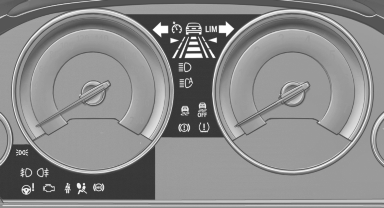
Indicator/warning lamps
The indicator and warning lamps can light up in a variety of combinations and colors.
Several of the lamps are checked for proper functioning and light up temporarily when the engine is started or the ignition is switched on.
Overview: indicator/warning lamps
Symbol / Function or system
 Turn signal
 Front fog lamps
 Rear fog lamp
 High beams
 High-beam Assistant
 Parking lamps, headlamp control
 Active Cruise Control
 Vehicle detection, Active Cruise
Control
 Collision warning
 Adjustable speed limit
 Cruise control
 Lane departure warning
 DSC Dynamic Stability Control
 DSC Dynamic Stability Control is
deactivated
or DTC Dynamic Traction
Control is activated
 Tire Pressure Monitor
Flat Tire Monitor
 Safety belts
 Airbag system
 Steering system
 Emissions
 Parking brake
Brake system
 In Canadian models
Parking brake
Brake system
 Antilock Brake System ABS
 Antilock Brake System ABS in
Canadian
models
 At least one Check Control
message
is displayed or is stored (symbol in
display)
See also:
Controls
Almost all functions can be operated in the same
manner as they are in the front. Special features
of operating the system in the rear are described
here. ...
Opening the main menu
Press the button.
The main menu is displayed
The main menu is displayed.
All iDrive functions can be called up via the main
menu. ...
Setting the clock
1. Press the button. The main
menu is
displayed.
2. Turn the controller until "Settings" is highlighted,
and then press the controller.
3. If necessary, move the controller to the ...