
Switching between cases, letters and numbers
Depending on the menu, you can switch between entering upper and lower case, letters and numbers:
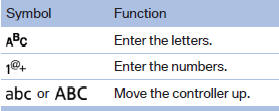
Without navigation system
Select the
 symbol.
See also:
Notes on Emergency
Requests
Do not use the voice activation system to initiate
an Emergency Request. In stressful situations,
the voice and vocal pitch can change. This can
unnecessarily delay the establishment of a teleph ...
Notes
CD/DVD player and changer
Do not remove the cover
BMW CD/DVD players and changers are
officially designated Class 1 laser products. Do
not operate if the cover is damaged; otherwise,
severe eye ...
All around the headliner
All around the headliner
1. Emergency Request
2. Glass sunroof
3. Indicator lamp for the front
passenger airbags
4. Reading lamps
5. Interior lamps ...