
Sorting the task list
1. Select the header in the task list.
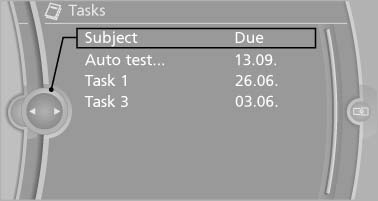
Sorting the task list
2. Select the sorting criterion:
▷ "Priority (!)"
▷ "Subject"
▷ "Due date"
See also:
Power failure
After a temporary power loss, some equipment
needs to be reinitialized.
Individual settings need to be reprogrammed:
▷ Seat, mirror, and steering wheel memory:
store the positions again.
...
Changing wheels
Notes
The vehicle equipment does not include a spare
tire.
When using run-flat tires or tire sealants, a tire
does not need to be changed immediately in the
event of pressure loss due to a fla ...
Closing
Recessed grips in the interior trim of the trunk
lid make it easier to pull down the lid.
Danger of pinching
Make sure that the closing path of the
trunk lid is clear; otherwise, injuries may ...