
Selecting the display
1.
 Press the button.
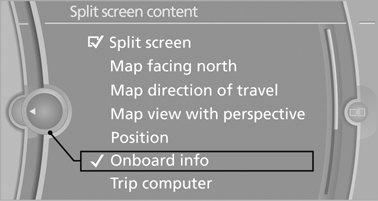
2. "Split screen" 3. Move the controller until the split screen is selected.
4. Press the controller or select "Split screen content".
5. Select the desired menu item.
See also:
Pinch protection system
If the closing force when closing the glass sunroof
exceeds a certain value, the closing movement
is stopped, beginning at approximately the
middle of the opening in the roof, or from the
tilt ...
Using the remote control
General information
Take the remote control with you
People or animals left unattended in a
parked vehicle can lock the doors from the inside.
Always take the remote control with you
when lea ...
Side View
The concept
Side View provides an early look at cross traffic
at blind driveways and intersections. Road users
concealed by obstacles to the left and right of
the vehicle can only be detected r ...