
Control Display
Notes
▷ To clean the Control Display, follow the care instructions.
▷ Do not place objects close to the Control Display; otherwise, the Control Display can be damaged.
Switching off
1.
 Press the button.
2. "Switch off control display"
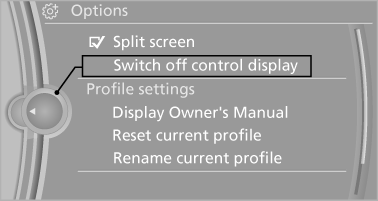
Switching off
Switching on
Press the controller again to switch the screen back on.
See also:
Navigation data
Information on the navigation data
1. "Navigation"
2. "Options" Open.
3. "Navigation system version": information on
the data version is displayed.
Updating the nav ...
Map view for split screen
The map view can be selected for the split
screen independently from the main screen.
1. Open "Options".
2. "Split screen"
3. Move the controller to the right repeatedly
unt ...
Opening/closing the glass sunroof
When the sliding visor is open, proceed as described
under Sliding visor. ...