
Tail lamps
▷ Turn signal, backup lamp: 21-watt bulb, H21W.
▷ Brake lamp, brake force display: 21-watt bulb, P21W
▷ Tail lamp: LED technology.
Contact your service center in the event of a malfunction.
Arrangement of tail lamps
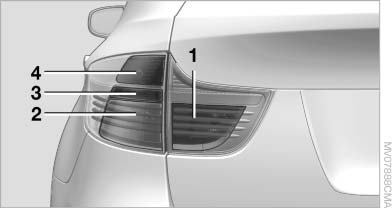
1 Brake force display/rear lamps
2 Brake lamp/rear lamp
3 Backup lamp
4 Turn signal
Brake lamps
1. Open the side panel in the cargo area.
2. Remove the first aid kit and warning triangle
if necessary.
3. Rotate the relevant bulb socket to the left
and remove.
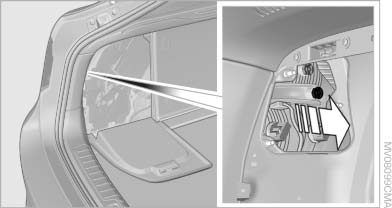
4. Apply gentle pressure to the bulb while turning
it to the left for removal and replacement.
5. Install in the reverse order.
Turn signal
1. Open the side panel in the cargo area.
2. Remove the first aid kit and warning triangle
if necessary.
3. Remove bulb holder along with bulb and replace.
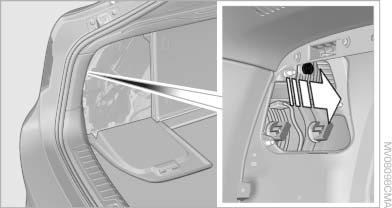
4. Install in the reverse order.
Backup lamp
1. Open the side panel in the cargo area.
2. Remove the first aid kit and warning triangle
if necessary.
3. Remove bulb holder along with bulb and replace.
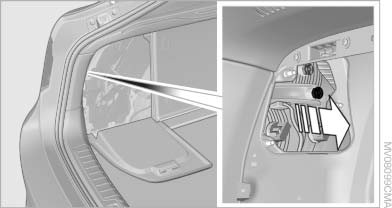
4. Install in the reverse order
Brake force display
1. Carefully remove the cover in the tailgate panel with a screwdriver.
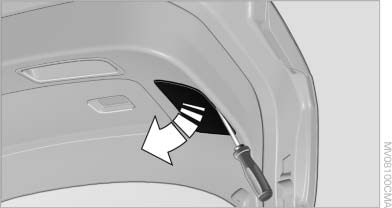
2. Rotate the bulb socket to the left and remove.
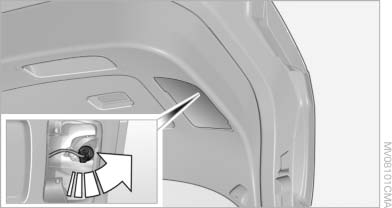
3. Apply gentle pressure to the bulb while turning
it to the left for removal and replacement.
4. Insert the bulb socket in the tailgate and engage
it.
5. Replace the cover.
License plate lamps
These lamps are made using LED technology.
Contact your service center in the event of a malfunction.
Center brake lamp
This lamp uses LED technology for operation.
Contact your service center in the event of a malfunction.
See also:
Switch off any functions that
are not currently needed
Functions such as seat heating and the rear window
defroster require a lot of energy and consume
additional fuel, especially in city and stopand-
go traffic.
Therefore, switch off these functio ...
Adjusting the info display
You can select what information from the computer
is to be displayed on the info display of the
instrument cluster.
1. "Settings"
2. "Info display"
3. Select the desired dis ...
Manually adjustable seats
At a glance
1 Forward/backward
2 Thigh support
3 Seat tilt
4 Backrest width
5 Lumbar support
6 Height
7 Backrest tilt
Forward/backward
Forward/backward
Pull the lever and slide the seat ...