
Redialing
General information
The list of dialed numbers in the mobile phone is transmitted to the vehicle depending on the mobile phone. Possibly only those numbers are displayed that were dialed from the vehicle.
The 20 phone numbers dialed last are displayed.
The sorting order of the phone numbers depends on the particular mobile phone.
Dialing the number via the iDrive
1. "Telephone"
2. "Redial"
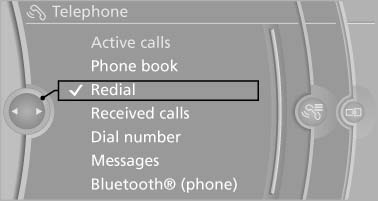
Dialing the number via the iDrive
3. Select the desired entry and the phone number if necessary.
The connection is established.
Saving an entry in the contacts
1. Highlight the entry.
2. Open "Options".
3. "Store as new contact" or "Add to existing contact"
4. Select "New phone number" or contact.
5. Select t he type of number:
"Home",
"Business", "Mobile", or "Other"
6. Complete the entries if necessary.
he type of number:
"Home",
"Business", "Mobile", or "Other"
6. Complete the entries if necessary.
7. If necessary, "Store contact in vehicle".
See also:
1982: the second generation - four-door, Convertible, Touring and BMW M3,
plus the first diesel engine for the sports sedan
The new BMW 3-Series oozed progress and variety out of every pore, as its
fresh new design, optimised aerodynamics, improved space and comfort, higher
output and additional body and engine variant ...
Disposing of old batteries
Have old
batteries disposed of by your
service center or bring them to a recycling
center.
Maintain the battery in an upright position for
transport and storage. Secure the battery so
that ...
Controller
Select menu items and create settings.
1. Turn.
2. Press.
3. Move in four directions.
Buttons on controller
...