
Adjusting the volume
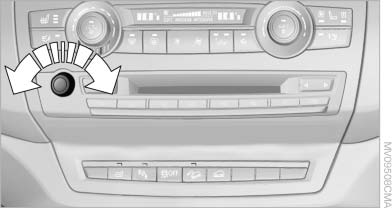
Adjusting the volume
Turn the knob until the desired volume is selected.
The setting is stored for the remote control currently in use.
The vehicle automatically adjusts the volume of the microphone on the telephone and the volume of the called party. Depending on the mobile phone, the volumes may need to be adjusted.
The settings can only be created during a call and must be adjusted separately for each telephone. The settings are deleted when the telephone is unpaired.
1. "Settings"
2. "Tone"
3. "Volume settings"
4. Select the desired setting: "Microphone" or
"Loudspeak."5. To adjust: turn the controller.
6. To store: press the controller.
See also:
Increasing or reducing speed
The speed can be changed in the range from
approx. 4 mph/6 km/h to approx. 15 mph/25 km/
h by pressing the accelerator or brake pedal
lightly.
A target speed within the same range can be
spec ...
Displaying images from CD/DVD
1. Push the CD/DVD into the drive with the labeled
side facing upward. The CD/DVD is
automatically pulled in.
2. Open the start menu with the remote control.
3. Select "Photo".
4. Pr ...
At a glance
▷ Display the traffic bulletins from radio stations
that broadcast the TI Traffic Information
of a traffic information service. Information
on traffic obstructions and hazards is
updated ...