
Unpairing a device
1. "Telephone"
2. "Bluetooth® (phone)"
3. Highlight the device that is to be unpaired.
4. Open "Options".
5. "Remove phone from list"
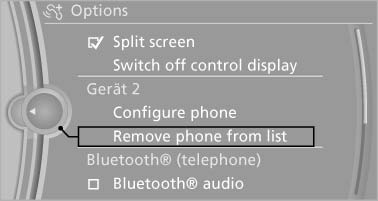
Unpairing a device
See also:
The concept
Starting at a specific speed, this system alerts
you when the vehicle on streets with lane markings
is about to leave the lane. Depending on the
country-specific version of the vehicle, the
sp ...
Calling up settings
Do not retrieve the memory while driving
Do not retrieve the memory setting while
driving, as an unexpected movement of the seat
or steering wheel could result in an accident.
Comfort function
...
Requirements
Via the Control Display, set a language that is
also supported by the voice activation system
so that the spoken commands can be identified.
Set the language ...