
Pairing and connecting a device
 Pairing a device
To avoid becoming distracted and posing
an unnecessary hazard both to your own vehicle's
occupants and to other road users, only
pair the device while the vehicle is stationary.◀
1. "Telephone"
2. "Bluetooth® (phone)"
3. "Add new phone"
The Bluetooth name of the vehicle is displayed.
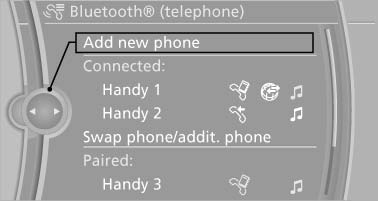
The Bluetooth name of the vehicle is displayed
4. To perform additional steps on the mobile phone, refer to the mobile phone operating instructions: for instance, search for or connect the Bluetooth device or a new device.The Bluetooth name of the vehicle appears on the mobile phone display.
5. Select the Bluetooth name of the vehicle on the mobile phone display.
You are prompted by the iDrive or mobile phone to enter the same Bluetooth passkey.
6. Enter the passkey and confirm.
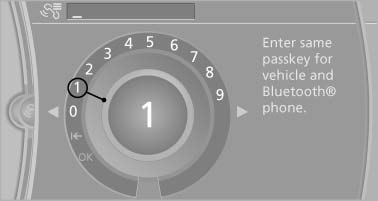
Enter the passkey and confirm
7. Select the functions for which the mobile phone is to be used.
8. "OK" If the pairing was successful, the mobile phone appears at the top of the list of mobile phones.
The functions supported by the mobile phone and audio device are displayed as symbols when paired.
White symbol: the function is active.
Gray symbol: the function is inactive.
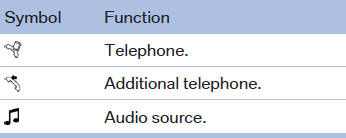
Four devices can be paired with the vehicle at once. Three devices can be connected with the vehicle at once.
If pairing was unsuccessful: What to do if...
See also:
High-beam Assistant
The concept
When the low beams are switched on, this system
automatically switches the high beams on
and off or suppresses the light in the areas that
blind oncoming traffic. The procedure is cont ...
Starting the engine
Starting the engine
Remote control in the ignition lock or, with Comfort
Access, inside the vehicle
1. Depress the brake pedal.
2. Press the Start/Stop button.
The starter operates automatical ...
The concept
Adaptive light control is a variable headlamp
control system that enables dynamic illumination
of the road surface.
Depending on the steering angle and other parameters,
the light from the head ...