
Connecting
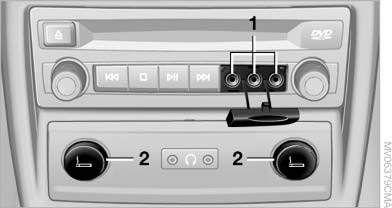
Connecting
1 Connections for audio/video cables. Watch the colors of the sockets when connecting.
Yellow socket: video White socket: audio on left Red socket: audio on right
2 Power supply for external device: socket with removable cap.
See also:
Display visibility
The visibility of the displays in the Head-up Display
is influenced by:
▷ Certain sitting positions.
▷ Objects on the cover of the Head-up Display.
▷ Sunglasses with certain pol ...
Vehicle equipment
All standard, country-specific and optional
equipment that is offered in the model series is
described in this chapter. Therefore, equipment
is also described that is not available in a vehicle, ...
Notes on Emergency
Requests
Do not use the voice activation system to initiate
an Emergency Request. In stressful situations,
the voice and vocal pitch can change. This can
unnecessarily delay the establishment of a teleph ...