
Displaying images
1. Use the buttons or the thumbwheel of the remote control to select an image.
2.  Press the button.
Displaying images
3. Displaying images:
▷ Scroll using the menu navigation buttons
of the remote control.
▷ Display the slide show: turn the thumbwheel
to set the display duration of the
images.
Stop the slide show: select "Stop".
Adjusting
1.  Press the
button.
Press the
button.
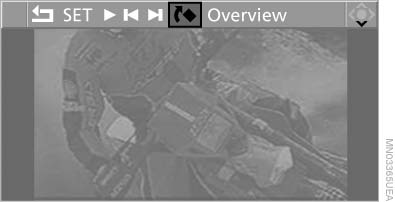
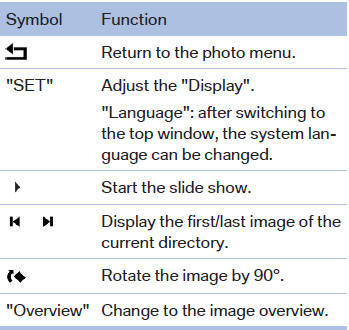
Adjusting
2. Select a menu item:
Ending display
1.  Press the
button.
Press the
button.
2.  Select the
symbol.
Select the
symbol.
3.  Press the
button.
Press the
button.
Eject CD/DVD
 Press the button
on the CD/DVD player.
Press the button
on the CD/DVD player.
See also:
Driving stability control systems
Your BMW has a number of systems that help to maintain the vehicle's stability
even in adverse driving conditions.
Antilock Brake System ABSABS prevents locking of the wheels during braking. Sa ...
Checking the address as a destination
An address that is to be used for destination
guidance must match the navigation data contained
in the vehicle. The address can be
checked for this purpose.
1. Select the desired contact and hi ...
Initializing
In rare cases, it may become necessary to initialize
the Integral Active Steering.
The warning lamp lights up. A Check
Control message is displayed.
1. With the engine running, turn the steeri ...