
Settings and playback functions for audio CDs
1. Select "SET".
2.  Press the button.
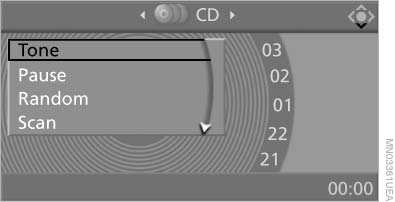
Settings and playback functions for
audio CDs
3. Make the settings with the remote control:
▷ "Tone":
▷ "Treble / Bass" and "Balance": separately
adjustable for the left and right
headphones and the infrared headphones.
▷ "Reset": the settings are reset to the default
values.
▷ "Pause": stop and continue playback.
▷ "Random": the CD tracks are played back
once in random sequence.
▷ "Scan": brief samples of all CD tracks are
automatically played one after another.
▷ "Repeat": repeat the current track. Select
again to end.
To exit from the menu:
 Press the buttons on the remote
control.
Press the buttons on the remote
control.
See also:
System limits
Be alert
Due to system limitations, warnings may
be not be issued at all, or may be issued late or
improperly. Therefore, always be alert and ready
to intervene; otherwise, there is the danger ...
Deleting contacts
Only contacts that are stored in the vehicle are
deleted. The contacts on the mobile phone cannot
be deleted.
1. "Office"
2. "Contacts"
3. Highlight the contact.
4. Open &q ...
Selecting menu items
Menu items shown in white can be selected
1. Turn the controller until the desired menu
item is highlighted
Turn the controller until the desired menu
item is highlighted
2. Press the control ...