
Making settings for DVD
1.
 Press
the button during playback.
Press
the button during playback.
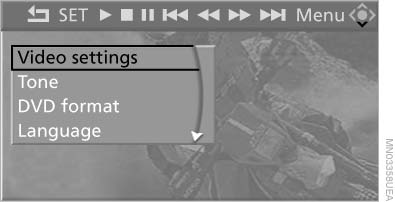
Making settings for DVD
2. Make the settings with the remote control:
▷ "Video settings":
▷ "Brightness", "Color", and "Contrast"
on the screen.
▷ After switching to the top window, you
can change other settings.
"Language": the system language of the
DVD system
"Display": background brightness of the
screen.
▷ "Tone":
▷ "Treble / Bass" and "Balance": separately
adjustable for the left and right
headphones and the infrared headphones.
▷ "Reset": the settings are reset to the default
values.
▷ "DVD format":
▷ "Standard"
▷ "Zoom": full-screen playback.
▷ "Language": language of the DVD playback.
The language advances one setting each
time the menu item is selected.
▷ "Subtitles": language of the subtitles or turn
off the subtitles.
▷ "Title": select individual tracks on the DVD.
▷ "Angle of view": camera angle.
Information or symbols that appear during
the playback of a film generally point out different
camera angles. These are usually only
briefly available.
▷ "Menu": open the DVD-specific menu.
▷ "Return": exit the menu, or:
 Press the buttons
on the remote control.
Press the buttons
on the remote control.
Many DVDs offer dialogs and subtitles in various languages or scene descriptions for the hearing impaired. These functions are stored on the DVD.
With some DVDs, it is only possible to select language, subtitles, camera angle, or title by using the DVD-specific menu. Consult the information accompanying your DVD.
See also:
Office
...
Antilock Brake System ABS
ABS prevents locking of the wheels during braking.
The vehicle remains steerable even during full
brake applications, thus increasing active
safety.
ABS is operational every time you start the ...
General information
Take the remote control with you
Take the remote control with you when
leaving the vehicle so that children, for example,
cannot operate the power windows and injure
themselves.◀
...