
Controls
Controls
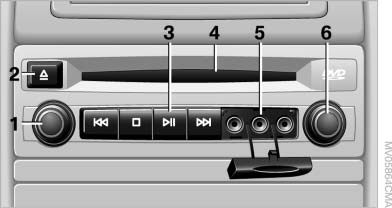
1. Press: switch the DVD system on/off Turn: left headphone volume and vehicle volume
2. Eject CD/DVD
3.  Beginning of
track
Beginning of
track
 Stop
Stop
 Playback, pause, freeze frame
 Next track
4. CD/DVD slot
5. Connectors for external device: cinch sockets
6. Press: switch the DVD system on/off Turn: right headphone volume and vehicle volume
See also:
Using contact data
At a glance
Contact data from appointments, tasks, text
messages, emails and notes can be stored or
selected.
Displaying contact or selecting phone
number
1. "Use contact data"
2. ...
The concept
Adaptive light control is a variable headlamp
control system that enables dynamic illumination
of the road surface.
Depending on the steering angle and other parameters,
the light from the head ...
Compartments in the doors
Do not stow any breakable objects
Do not store any breakable objects, e. g.
glass bottles, in the compartments, or there is
an increased risk of injury in the event of an accident.◄ ...