
Software Update
The vehicle supports various external devices depending on the current software version. With a software update, the vehicle can support new cell phones or new external device, for example.
▷ USB.
Software updates and related current information is available at www.bmw.com/update.
Displaying the current version
The currently installed software is displayed.
1. "Settings"
2. "Software update"
3. "Show current version"
Select desired version to display additional information.
Updating software via USB
The software may only be updated when the vehicle is stationary.
1. Store the file for the software-update in the main director of a USB flash drive.
2. Insert the USB flash drive into the USB interface of the USB audio interface in the center armrest. An update via the USB interface in the glove compartment is not possible.
3. "Settings"
4. "Software update"
5. "Update software"
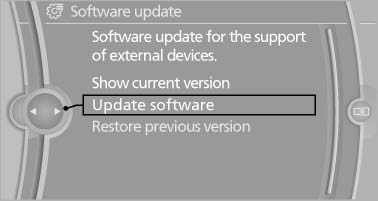
Update software
6. If necessary. "USB".
7. "Start update"
8. "OK"
All listed software updates are installed.
Restoring the previous version
If it should become necessary, the software version prior to the last software update can be restored.
The previous version can only be restored when the vehicle is stationary.
1. "Settings"
2. "Software update"
3. "Restore previous version"
4. "OK" Double-click.
All listed software updates are removed.
Note
While the software is being updated or a previous version is being restored, BMW Assist, Office functions, and the connected devices are temporarily unavailable. Wait several minutes for the functions to become available again.
See also:
Capturing the image
The image is captured by two cameras
integrated in the exterior mirrors and by the
backup camera.
The range is at least 7 ft/2 m to the side and rear.
In this way, obstacles up to the height of ...
Switching the microphone to mute
When a call is active, the microphone can be
muted.
1. "Telephone"
2. "Active calls"
3. "Microphone mute"
A microphone that has been switched to mute
is automati ...
Actions in the event of a flat tire
Normal tires
1. Identify the damaged tire.
Do this by checking the air pressure in all
four tires.
If the tire inflation pressure in all four tires is
correct, the Tire Pressure Monitor may not ...