
Controls
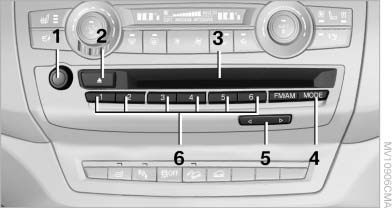
Controls
1 Volume, on/off
2 Eject CD/DVD
3 CD/DVD drive
4 Change the entertainment source
5 Change station/track
6 Programmable memory buttons
See also:
Changing batteries
Changing batteries
1. Press the detent and remove the cover.
2. Change the batteries. The type and installation
position are marked on the bottom of
the battery compartment.
3. Close the cove ...
Indication in the info display
The information from the
computer
is shown in the Info display
in the instrument cluster. ...
Interior
The interior has a 2+2 seating configuration with small rear seats, though
BMW says those seats get more legroom than the previous generation. Headroom has
also increased in the front and rear. Tr ...