
Storing the position
The current position can be stored in the address book.
1. "Navigation"
2. Open "Options".
3. "Store position as contact" or "Add position to contact"
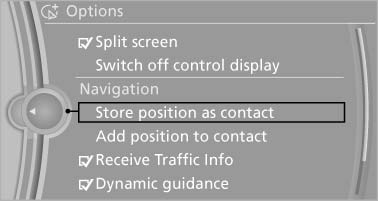
Store position as contact
4. Depending on the selection, choose an existing contact from the list. Select the type of address and enter the first and last name.
5. "Store in vehicle"
See also:
Turn signal, high beams, headlamp flasher
Turn signal, high beams,
headlamp flasher
1. High beams
2. Headlamp flasher
3. Turn signal ...
Snow chains
Fine-link snow chains
Only certain types of fine-link snow chains have
been tested by the manufacturer of your vehicle,
classified as road-safe and recommended.
Consult your service center for m ...
Displays in the instrument cluster
1 Display of desired speed
2 Indicator lamp
3 Brief status display
Desired speed
Display in the speedometer:
The marking lights up in
green: the system is active.
The marking lights u ...