
Opening
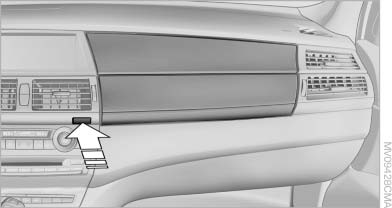
Opening
Press the button. The covers open upward and downward and the lighting in the glove compartment switches on.
 Close the glove compartment again immediately
Close the glove compartment immediately after
use while driving; otherwise, injury may occur
during accidents.◀
Closing
Press one of the two covers closed.
See also:
Supplementary text messages
Addition information, such as on the cause of a
fault or the required action, can be called up via
Check Control. The supplementary text of urgent
messages is displayed automatically.
It is sh ...
Mounting LATCH child restraint fixing
systems
1. Mount the child restraint fixing system; refer
to the operating instructions of the system.
2. Ensure that both LATCH anchors are properly
connected. ...
Switch off any functions that are not currently needed
Functions such as seat heating and the rear window
defroster require a lot of energy and consume
additional fuel, especially in city and stopand-
go traffic.
Therefore, switch off these functio ...